How AI is Changing the Way We Work
A simple look at artificial intelligence and how it affects your daily life.
Read full article →I understand that choosing the right platform to launch your business, portfolio, and blog can feel completely exhausting and overwhelming. There are unlimited platforms asking for your attention; it is easy to pick a website builder that looks simple at first but later asks for high monthly costs and limited features.
People who are experienced in this IT field know how things work, but those who don’t know anything about how this system works can feel overwhelmed because they don’t know what website builder to choose; they don’t know how these things work. If you are looking for the best website builder site for your business or your personal blog without knowing how to write code, then this guide is for you. This guide breaks down the top choices based on pricing, real seo performances, and ease of use.
Before looking at the list, you must understand a hard truth and risk. These website builders are really good for fast and simple setup. But there’s one problem: they generate heavy background code that can slow down your site. Slow sites cause problems, and they don’t deliver good performance.
If you want a website that has a perfect 100% PageSpeed score and ranks at the top on Google, a custom-built website is my recommendation. For example, my entire blog is built on a custom framework, and it has a 100% PageSpeed score. But if you’re not a developer and need a fast, code-free setup, then the platforms below are the best options for you.
Here are the 8 best website builder sites for beginners, simple tools that help you create a website without coding. Whether you want a blog, portfolio, or small business website, these platforms make it easy to start.
WordPress powers over 40% of the internet. That number is not an accident. There are two versions of WordPress. One is WordPress.org and the second is WordPress.com. WordPress.org is the self-hosted one. You download the software, get your own hosting, and build whatever you want. WordPress.com is the hosted version where you don't manage the technical side, but you have fewer options. For beginners, the self-hosted version is usually the better long-term choice. But it takes a bit more setup. You need hosting and a domain.
But once you're set up, the possibilities are almost endless. Thousands of free and premium themes are available. It has over 60,000 plugins. You can use WordPress for your personal blog, a business, a membership site, and an online store. But it’s not as simple as Wix or Squarespace platforms. You’ll need to spend some time learning the dashboard. If something breaks, you fix it. You’re responsible for all the maintenance, updates, security, and backups. I know this is too much for a beginner. But there are millions of tutorials about WordPress on YouTube and other sites. You can learn from there.
Wix is still one of the simplest and most popular choices for beginners. It gives you total freedom. You drag and drop elements anywhere. Text over here, Image over there, move that button three centimeters to the left. No other builder gives you this level of control without code. The honest downside? That much freedom can be overwhelming.
If you don't have a good eye for design, it's easy to make a page look messy. And here's the real problem most reviews don't tell you: if you pick a template and later change your mind, you can't just switch. You have to rebuild from scratch. Wix is best for people who want a custom look and are willing to put in the time. If you're patient, you'll love it. If you want fast and simple, it might frustrate you.
If your main goal is selling products online, Shopify is the one. It's not just a website builder. It's a full e-commerce system built from scratch. Shopify handles all the hard stuff: payments, Shipping, Inventory, Taxes. You don't have to connect ten different tools. But there’s a downside to Shopify. It’s more expensive than most builders. Many of the best features require paid apps. And if you stop paying, your store goes offline. Shopify is best for anyone selling physical or digital products. If you just want a blog, then this is not the right option for you.
Squarespace is for people who want a beautiful site without being a designer. It's known for stunning templates and a clean, modern look. Instead of dragging elements anywhere, you work within a structured grid. The grid keeps everything aligned. The templates are professionally designed. Squarespace is best for portfolios, photography sites, blogs, and small business sites where looks matter.
If you don’t need a fancy website, then Hostinger is a good option. Hostinger is primarily a hosting company, but it also offers a website builder. It is simple, fast, and cheap. biggest selling point is the price. One of the cheapest out there. You can get a basic site online for a few dollars a month. They've added AI tools recently. You answer a few questions, and it generates a draft. It's not perfect, but it's a good starting point. But there’s one problem: it’s not as powerful as others. The templates are basic, but if you need a simple website, this is a good choice.
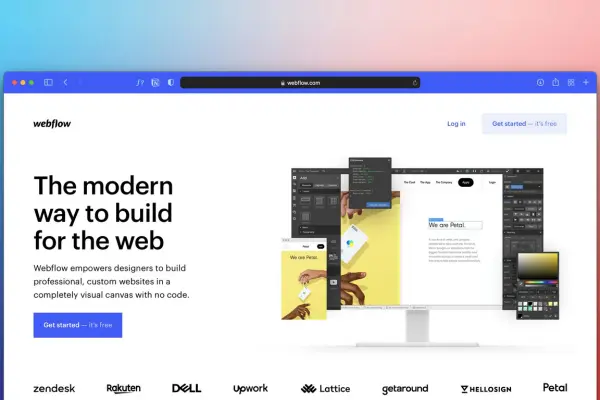
Webflow is technically a website builder, but in a different category. It’s designed for people who think like developers. Webflow is in a different category. It's technically a website builder, but it's designed for people who think like developers. Total control over design and code. Animations, interactions, layouts you can't do anywhere else.
But it's not beginner-friendly. To use it well, you need to understand CSS, flexbox, and the box model. If you've never done web design, it'll feel overwhelming. I've seen beginners give up within a day. I've also seen beginners commit and become incredibly skilled. It depends on your willingness to learn.
GoDaddy is mostly known for domains, but they also offer a website builder. The advantage is convenience. If your domain is already there, you build in the same place. It is designed for total beginners. It has AI tools and a simple editor that can generate a site in minutes. It is good for basic presence, but it also has a downside. It is not as powerful and flexible as other website builders, and its features are limited.
Weebly used to be one of the most popular website builder sites for beginners. It is still popular but now it’s owned by Square. Weebly is very easy to use and great for basic sites. You just have to simply drag and drop. Weebly's downside is that templates feel outdated, and tools aren’t as powerful as other sites. But it is still best for someone who wants a simple and basic website.
Honestly, it depends on your priority and what you are looking for. If you Want to sell things? Shopify. If you want a beautiful website with less fiddling? Squarespace. If you want maximum control and freedom? Wix. Just need something cheap and simple? Hostinger. Willing to learn and want total ownership? Wordpress. Want total design control and willing to learn code-like concepts? Webflow.
My best advice: don't spend weeks researching. Pick one that sounds good according to your priority, start the free trial and try for one or two weeks. You'll know within an hour if it clicks. If not, try another. The best builder is the one you'll actually use. So stop reading and start building.
Not everyone can code. But anyone can build a website now. Here are the 8 best website builder sites for beginners.
Read full article →staying productive is tough. Here are the 10 best apps for productivity that can actually help.
Read full article →Here are 10 proven ways to earn money online for beginners. Freelancing, affiliate marketing, e-commerce, and more."
Read full article →A few worth your time
 Technology
A simple look at artificial intelligence and how it affects your daily life.
Read full article → Finance
Honest lessons about saving and spending from someone who learned the hard way.
Read full article → Mental well-being
Self-care is not selfish,it is the necessary practice of taking care of yourself to prevent burnout and manage stress.
Read full article →